If you’re building a website for your business, you’ve probably come across two of the biggest website platforms available: Wix and WordPress.
Both can create professional-looking websites.
Both are popular.
And both can work well — depending on what your business actually needs.
But there are some important differences between them, especially when it comes to flexibility, growth, customization, maintenance, and long-term control.
Here’s a simple breakdown to help you understand the difference between Wix and WordPress — without the overwhelming tech language.
What Is Wix?
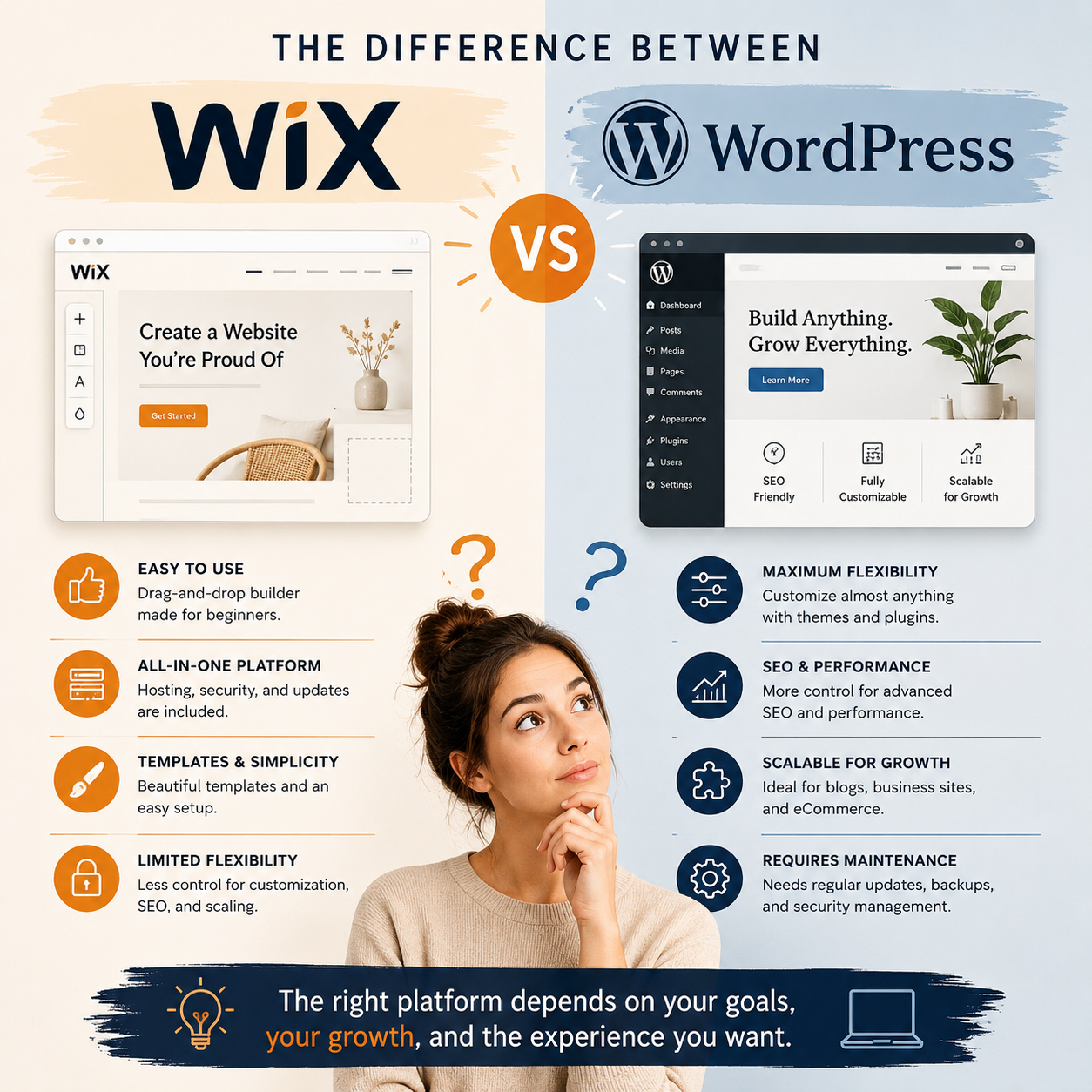
Wix is an all-in-one website platform designed to make website creation simple for beginners.
It includes:
- website hosting
- templates
- drag-and-drop editing
- security
- updates
- and support
Everything is managed inside the Wix platform.
For many small businesses, this simplicity is appealing — especially when starting out.
Wix Is Often Good For:
- beginners
- simple websites
- people who want an easy setup
- businesses with smaller websites
- people who don’t want to manage technical maintenance
Some Limitations of Wix
As businesses grow, some people begin to feel limited by:
- design flexibility
- SEO control
- advanced customization
- performance
- scaling larger websites
- moving away from the platform later
Wix is designed for simplicity first — which sometimes means less flexibility later.
What Is WordPress?
WordPress is a much more flexible website platform used by businesses, developers, bloggers, and large organizations around the world.
Unlike Wix, WordPress is self-hosted, which means:
- you choose your hosting provider
- you have more control
- you can customize almost everything
- and your website can grow more easily over time
WordPress powers a huge portion of the internet because it’s highly adaptable.
WordPress Is Often Good For:
- growing businesses
- custom websites
- SEO-focused websites
- blogs and content-heavy sites
- businesses needing flexibility
- ecommerce websites
- long-term scalability
Some Challenges With WordPress
WordPress does require more management.
This can include:
- plugin updates
- backups
- security maintenance
- occasional troubleshooting
Without proper maintenance, WordPress websites can become:
- outdated
- slow
- vulnerable to issues
- or difficult to manage
That’s why many business owners work with a web designer or maintenance support.
Wix vs WordPress: The Biggest Differences
Ease of Use
Wix is generally easier for beginners.
It’s designed to be:
- simple
- guided
- beginner-friendly
WordPress has a larger learning curve, especially at first.
But it also gives significantly more control and flexibility.
Flexibility
This is one of the biggest differences.
With WordPress, you can customize almost anything:
- layouts
- functionality
- integrations
- ecommerce
- SEO tools
- design structure
Wix is more limited because it keeps everything inside its own system.
SEO
Both platforms support SEO.
However, WordPress typically gives:
- deeper SEO control
- more advanced optimization options
- stronger blogging flexibility
- and better long-term content scalability
This is one reason many businesses eventually move from Wix to WordPress as they grow.
Maintenance
Wix handles most maintenance automatically.
That simplicity is convenient for many users.
With WordPress, maintenance becomes part of website ownership:
- updates
- backups
- security
- plugin management
This creates more responsibility — but also more freedom and control.
Long-Term Growth
Wix works well for many small websites.
But businesses sometimes outgrow it when they need:
- more customization
- advanced features
- stronger SEO
- ecommerce growth
- or greater flexibility
WordPress is generally better suited for long-term growth and expansion.
Which Platform Is Better?
There isn’t one perfect platform for everyone.
The better question is:
What does your business actually need right now — and what might it need later?
Wix May Be a Good Fit If:
- you want simplicity
- you need a smaller website
- you want minimal technical management
- you’re starting with a lower budget
- you prefer an all-in-one system
WordPress May Be a Better Fit If:
- your business is growing
- SEO matters heavily to you
- you want more customization
- you need flexibility
- you plan to expand your website over time
- you want more ownership and control
You Don’t Need the “Perfect” Platform
Many business owners worry about making the wrong choice.
But the reality is:
- businesses evolve
- websites evolve
- and platforms can change over time too
The most important thing is having a website that:
- supports your business goals
- feels manageable
- works well for visitors
- and can grow alongside your business
Need Help Deciding Between Wix and WordPress?
Choosing a platform can feel overwhelming — especially when every article online claims one option is “best.”
The truth is that the right choice depends on:
- your goals
- your budget
- your comfort level with technology
- and how much flexibility you may need in the future
If you’re unsure which platform makes the most sense for your business, I can help you:
- understand the pros and cons
- evaluate your current website
- plan for future growth
- and choose a setup that feels realistic and manageable
Sometimes a quick conversation can save a lot of futur